
On this page
Peptide protocols are easy to start and easy to lose track of.
Most people do not quit because the protocol failed. They quit because after a few weeks nobody can say what was actually taken, what is left, or whether any of it worked.
A peptide tracking app exists to put that back in one place. Below are the eight peptide apps people actually end up choosing in 2026, what each one costs, and which one fits the way you run your protocol.
The short answer
- MyPeptideApp is the most complete peptide tracking app and is genuinely free. Doses and schedules, the reconstitution calculator, medication level curves, bloodwork and vial inventory, for unlimited compounds, with no paid tier.
- Regimen is the best paid app if you want Apple Health or Google Health Connect syncing. Free for one compound, then a subscription.
- Smart Peptide Tracker suits Android users who would rather buy once than subscribe.
- Most of the rest are iPhone only, GLP-1 only, or free right up until you add a second compound.
The 8 best peptide tracker apps in 2026
Trackers get abandoned fast, and usually for the same reasons: they start charging, they cap how many compounds you can log, or they never show what is actually in your system.
| App | Price | Works on | Compounds | Medication levels | Bloodwork |
|---|---|---|---|---|---|
| MyPeptideApp | Free, no tiers | Any browser | Unlimited | Built in | Built in |
| Regimen | Free tier, then paid | iOS, Android | 1 free, then paid | Built in | Built in |
| PeptIQ | Subscription for full access | iOS, Android, web | Multiple | Premium only | Built in |
| Smart Peptide Tracker | Free with ads, one time Premium | iOS, Android, web | Multiple | Not listed | Built in |
| PepTracker | Free tier, then paid | iPhone only | 2 protocols free | Not listed | Not listed |
| LynkDose | Free download, then subscription | iPhone only | Multiple | Not listed | Built in |
| Peptide Tracker & Calculator | Free, subscription for full access | iPhone, iPad | Multiple | Not listed | Built in |
| Shotsy | Free, optional premium | iOS, Android | GLP-1 only | Built in | Not listed |
Last checked 26 July 2026 against each app's store listing and official site. Pricing and features move quickly, so confirm at the source before you pay for anything.
Which peptide tracker fits your situation
Most peptide tracking apps are good at one specific thing. Find the line that sounds like you.
- You want everything free
- MyPeptideAppNo premium tier and no compound cap, so the free version is the whole product.
- You want Health Connect on Android
- Smart Peptide TrackerThe only app here that treats Android as a first class platform, with Google Health Connect and a one time Premium unlock instead of a monthly bill.
- You want Apple Health data
- RegimenHealthKit sync pulls weight, sleep and HRV onto your dose timeline.
- You track on a laptop too
- MyPeptideAppThe deepest web based option in the list, so the full protocol opens on phone, tablet and desktop with nothing to install.
- You only run a GLP-1
- ShotsyBuilt around semaglutide and tirzepatide titration. Nothing else, but that one job is done well.
Every app in detail
01 MyPeptideApp
A full protocol workspace rather than a dose log: schedules, the reconstitution calculator, medication levels, health metrics and vial inventory in one place. There is no paid tier, so nothing is held back.
What works
- A reconstitution calculator that gives you the exact mark to draw to on your syringe, and how many doses the vial holds
- Medication level curves modelled from each compound's half life, so you see what is in your system between doses
- Health metrics with goals, so you can tell whether the protocol is actually moving the numbers
- Bloodwork with sex and age aware reference ranges plus optimal ranges, kept alongside the protocol that produced them
- Vial inventory with cost and expiry, and an order calculator for how much a full cycle needs
Trade offs
- No App Store build, so reminders arrive as web push
- No Apple Health or Google Health Connect sync
- No AI assistant
Verdict. The most complete free option in this list, and the widest toolkit if you run more than one compound at a time.
02 Regimen
The deepest paid tracker in the category, built around pattern detection rather than plain logging.
What works
- Apple Health and Google Health Connect sync pulls weight, sleep, resting heart rate and HRV onto your dose timeline
- Labs plot against the dose timeline, with correlation detection on top
- A 200+ compound and brand library, plus built in reconstitution, injection volume, split dose and intranasal calculators
Trade offs
- The free tier stops at one compound
- A stack means a monthly or yearly subscription
Verdict. The right answer if wearable data matters to you and the subscription is not an issue. For a stack it is the most expensive way to do what MyPeptideApp does free, minus the HealthKit link.
03 PeptIQ
A tracker with an education layer on top, plus an AI scanner that reads a vial label for you.
What works
- An AI vial scanner that fills in compound details from the label
- Deep compound profiles with half life, storage and stacking notes, and AI answers that link back to the studies behind them
- Ships on iPhone, Android and the web
Trade offs
- Their pricing page states there is no free plan, so logging, the calculator and the half life tracker all sit behind Premium
- The most expensive subscription here at $19.99 a month or $79.99 a year at list price
Verdict. The deepest reference library in this list, and the citations are the real draw. The catch is price, because there is no free tier to try it on first.
04 Smart Peptide Tracker
The one app here that treats Android as a first class platform, with a one time Premium unlock rather than a subscription.
What works
- Real Android support with Google Health Connect, not a thin port
- Start without an account, and export your data at any point
- Flexible schedules, including every other day and five on, two off, plus biomarker lab logging in the free tier
Trade offs
- Ads unless you buy the one time Premium unlock
- Progress analytics, the stack analyzer and the dosing guide are Premium only
Verdict. The best native pick on Android, and the honest choice if subscriptions are the thing you object to. Try MyPeptideApp in Chrome first to see whether you need to buy anything at all.
05 PepTracker
A deliberately simple dose log for iPhone.
What works
- Name a compound, set a schedule, start logging
- The calendar view makes adherence obvious at a glance
Trade offs
- The calculator as described runs forward only, from vial and water to units
- No lab tracking and no level curves listed
- iPhone only
Verdict. A good first protocol on iOS. Most people outgrow it around the time they add a second compound.
06 LynkDose
An iPhone tracker built around inventory, site rotation and Apple Health, with a local first design.
Verdict. Vial stock, expiry reminders, lab uploads and Apple Health charts are all handled well, and the developer describes it as local first. Worth opening the App Store privacy label yourself before you commit, since it does declare tracking identifiers. iPhone only, free to download, with full tracking on a subscription.
07 Peptide Tracker & Calculator
An inventory led iOS app, aimed at people running several vials at once.
Verdict. Detailed vial inventory across a large compound range, with injection site rotation tracked properly rather than as an afterthought, plus bloodwork logging with custom markers and saved ranges. Apple only, and full access is a single subscription rather than a genuinely free app. Solid if inventory is your main pain point and you are on iOS.
08 Shotsy
Not a research peptide tracker, but it ranks in these searches, so it is worth naming honestly.
What works
- Built around semaglutide and tirzepatide titration schedules
- Estimated medication levels between shots, plus side effect and weight tracking tuned to GLP-1 patterns
- iCloud sync on iOS, cloud sync on Android
Trade offs
- GLP-1 medications only, with no research peptide support
- Some tools sit behind a premium tier
Verdict. Good at its one job. The moment you add BPC-157 or a GH secretagogue next to your GLP-1, it stops covering your protocol.
What a peptide tracker actually has to do
Twelve weeks into a protocol the question is always the same: is this doing anything? Answering it takes an accurate record of what you took sitting next to an honest record of what changed. Most setups have neither. Five things decide whether an app can answer that question or whether it is a reminder app with a peptide name on it.
- A reconstitution calculator you can trust. Drawing to the wrong mark is not a ten percent error, it is a tenfold one. Vial strength plus the bacteriostatic water you added, turned into the exact mark to draw to and how many doses the vial still holds.
- Dose logging that takes seconds. Anything slower gets skipped on the mornings you are in a hurry, and a log with holes in it cannot answer anything three months later. Compound, amount, time and injection site, captured before you have put the syringe down.
- Medication level curves. A list of dates tells you what you did. Half life modelling tells you what was actually in your system on the day you felt different, and when a compound reaches steady state.
- Your own numbers, charted against your doses. Weight, blood pressure or sleep on their own are noise. With your dose history marked on the same chart, a change lines up with the week you caused it, and bloodwork belongs in the same app for the same reason.
- A free tier that holds a real protocol. Not a demo. If the wall appears at compound two, the app was never free for you.
Most people run two or three compounds at once. A free tier capped at one is a trial with better marketing.
Is a free peptide app good enough?
Free is a fair thing to be suspicious about. With health apps the catch is usually your data, or a wall that appears the moment you get serious.
So it is worth being precise about what free means in this category, because it means four different things:
- Free to download, paid to use. The listing says free, the second compound does not. This covers most of the App Store.
- Free for a limited protocol. One compound or two, everything included. Fine for a first cycle, a wall after that.
- Free tools, paid tracking. A public calculator on the website, a subscription for the log.
- Free with no upgrade path. Rare, because there is usually a funding round expecting a return.
MyPeptideApp is in the last group. There is no funding round to answer to, so nothing is gated.
The honest trade off is that there is no App Store build and no Apple Health sync. If either is a dealbreaker, a paid app suits you better.
Why MyPeptideApp is our free pick
Disclosure first: this is our app, so read this section knowing that. The table above is where we tried to be even handed, gaps included.
MyPeptideApp started as a community project rather than a business. It was built for people who were already running protocols and comparing notes, on the idea that keeping track of what you take should not be a paid feature. That is also why it opens in a browser instead of a store, and why it stays free.
The case is narrow and it is about structure rather than features. MyPeptideApp never had a subscription to protect, so the parts other apps hold back are simply included.
- Nothing to install. It opens at mypeptideapp.com in whatever browser you already have. On a phone, Add to Home Screen gives you a full screen app without the App Store.
- The same protocol on every device. Log a dose on your phone, read the charts on a laptop, with nothing to install and nothing to pay.
- No compound cap. Run one peptide or a full stack, with a separate log per compound and a combined view across them.
- The paid features, free. Medication level curves, bloodwork with reference ranges, vial inventory and protocol sharing, none of it behind a wall.
Your whole stack, tracked for free
Log doses, watch half life curves, keep bloodwork and metrics next to them. Every feature, every compound, no upgrade tier.
Start tracking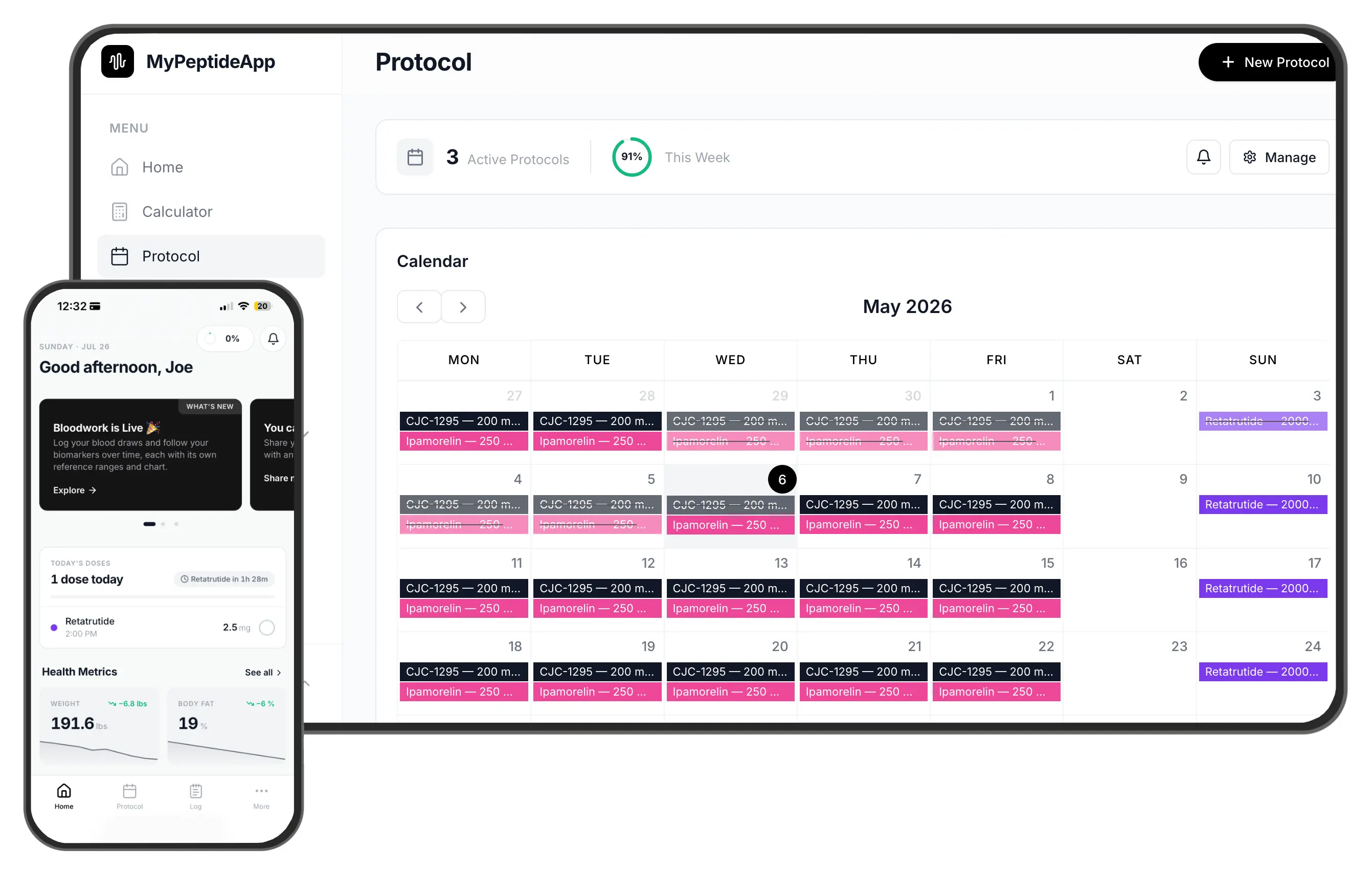
Frequently asked questions
What is the best free peptide tracker app in 2026?
What is the best peptide app overall, free or paid?
Is there a peptide tracker that is completely free?
What is the best peptide tracker app for Android?
Is there a good peptide tracker for iPhone?
Can I track peptides on a laptop or desktop?
Do I have to download an app or create an account?
Can I track more than one peptide at the same time?
Do peptide tracker apps work out how many units to draw?
Is a peptide tracking spreadsheet good enough?
Can I track bloodwork alongside my doses?
Disclaimer: MyPeptideApp is an informational tracking tool. It is not a medical device, and it is not a substitute for professional medical advice. Nothing on this page is medical advice or a recommendation to start, change or stop any protocol, and no compound named here is endorsed for human use. Many peptides are unapproved and their legal status differs from country to country, so check the rules where you live. Always speak with a qualified healthcare provider about your own situation before making decisions. The other apps named on this page are independent products, not affiliated with or endorsed by MyPeptideApp, and their pricing and features reflect public listings on the date shown above. Track responsibly. Read the full disclaimer.